Plant Hire Management Software for Construction Contractors
Manage hired plant from order to off-hire. Track suppliers, rates, deliveries, order status, collections and contract costs, all without the hire desk spreadsheet.
Hired plant is easy to order and hard to keep hold of
Ordering hired plant is a phone call. Keeping track of it afterwards is the hard part: which supplier it came from, what rate was agreed, whether it arrived, which contract it's on now, and whether anyone remembered to off-hire it when the work finished. When that lives in spreadsheets and inboxes, hires get forgotten, rates drift, and the first anyone hears of it is the invoice.
Multiply that across multiple contracts and suppliers and hired plant becomes difficult to control, even though every hire began as a deliberate decision.
Every hire, from order to collection, in one system
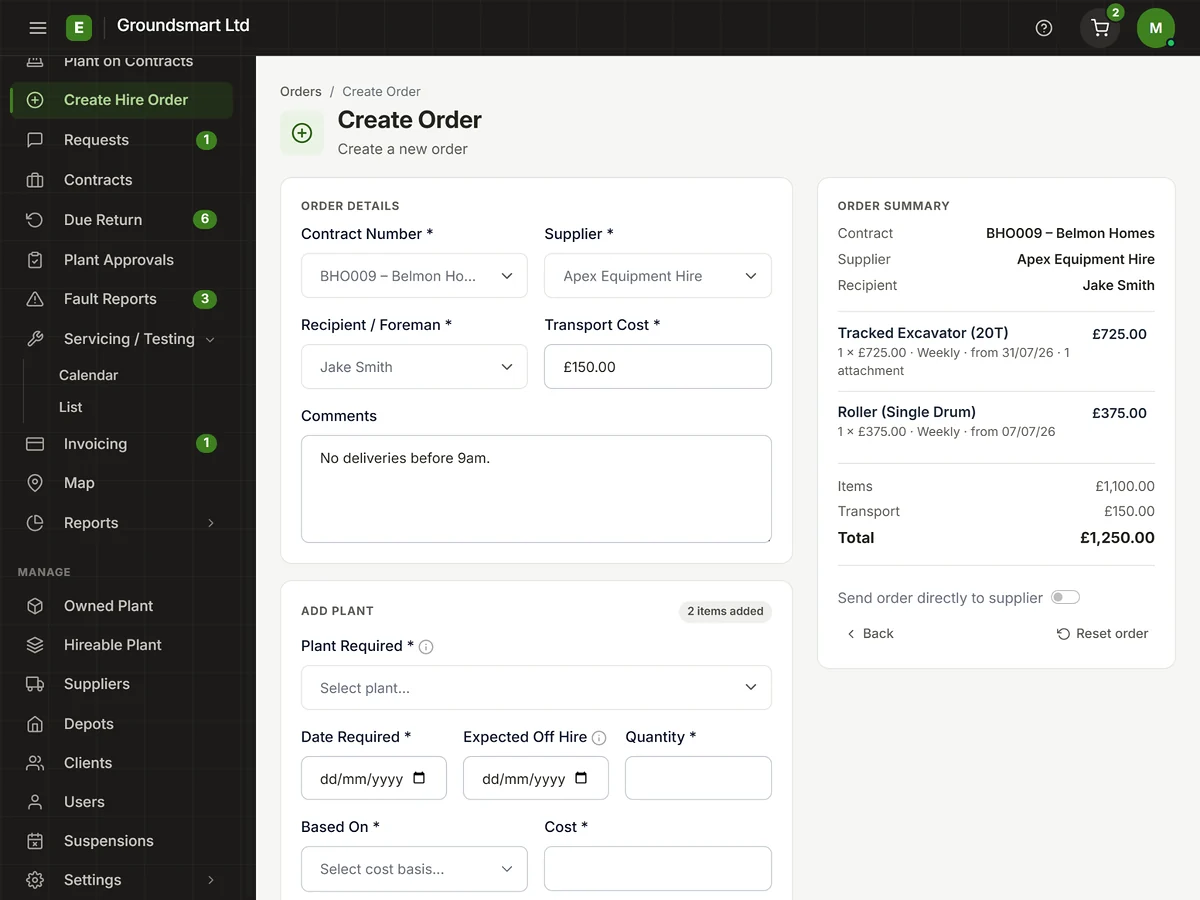
In Equipbase, every hire starts as a plant order raised against a contract and a supplier. Where agreed rates are held, they can be applied to the order. Each item then carries its own status through Requested, Awaiting Delivery, On Site, Off-hire Requested, Awaiting Collection and Off Hired.
Because the order, the contract, the supplier, the rate and the dates are all in one record, hire costs build up automatically as the hire runs, off-hires are tracked rather than remembered, and finance has a recorded basis for comparing supplier invoices with the agreed rates and hire periods.
What you can do with plant hire management
Raise plant orders against contracts
Order hired plant against a specific contract and supplier, with the plant type, quantities, dates and rates on the order from day one.
Track delivery and on-site status
Follow each item from Requested and Awaiting Delivery to On Site, so contract teams know what's coming and the office can see the recorded status.
Order against agreed supplier rates
Orders can use the supplier rates held in Equipbase, making the agreed rate and expected starting cost visible before the supplier invoice arrives.
Manage off-hires and collections
Move items from Off-hire Requested through Awaiting Collection to Off Hired, with the relevant dates kept on the order.
See hire costs as they build
Hire costs accrue against the contract while the plant is on hire, so nobody waits for month end to find out what a site is spending.
Keep the full hire history
Orders, status changes, documents and notes stay on the record to support rate queries and claims.
Who plant hire management helps
Plant managers
- Live hires across contracts in one view
- Off-hires chased by status, not memory
Site teams
- See what's been ordered and what's arriving
- Request off-hires the moment work finishes
Finance teams
- Check supplier invoices against orders and rates
- Hire costs by contract without the spreadsheet work
Frequently asked questions
Can we track hires from multiple suppliers on one contract?
Yes. Orders are raised per supplier, and the contract view brings the recorded hires on that contract together regardless of who supplied them.
How do off-hires work?
An off-hire is requested against the specific items that are finished, either from the office or by the site team. The request and the collection are tracked as statuses on the order, so you can see what's awaiting collection and evidence when the hire ended. See off-hire management for the full workflow.
Does it handle part off-hires?
Yes. You can off-hire some items on an order while the rest stay on hire, which is how most real hires actually end.
Where do supplier rates come from?
You hold agreed rates per supplier in Equipbase, and new orders can use the relevant held rate. See supplier rate management for how rates are stored and applied.
Can site staff raise orders?
Site users can request plant for their contracts; the office keeps control of what's actually ordered and from whom. That keeps ordering fast without losing control of suppliers and rates.