Browser-Based Plant Management for Site Teams
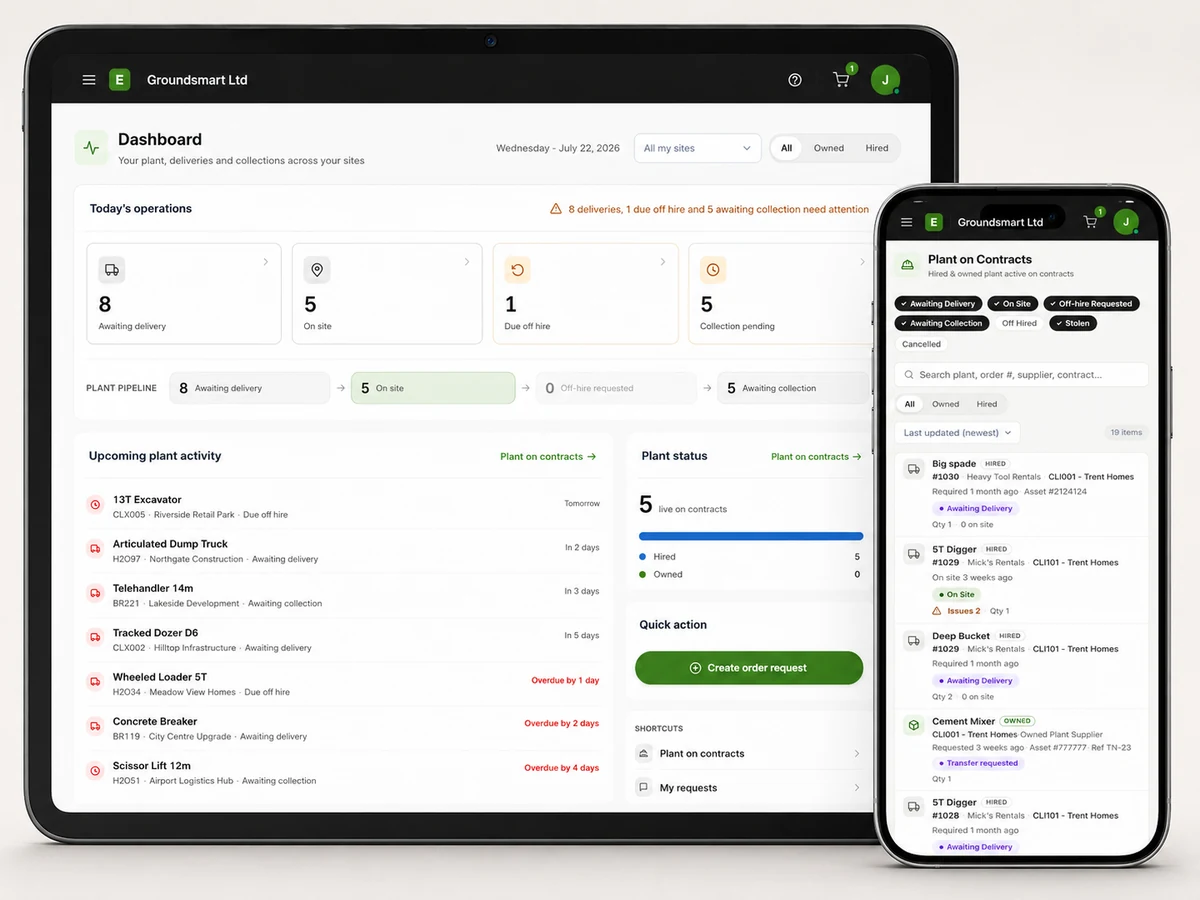
Give site teams browser-based mobile access to view plant, raise requests, request off-hires and report faults, damage or theft. No app is required.
Plant management that only works at a desk doesn't work on site
The people who know the ground truth about plant (it arrived, it's finished, it's broken, it's gone) are on site, in boots, nowhere near the system. So the truth travels by phone call and WhatsApp message to someone at a desk, who retypes it, later, sometimes. Every hop loses detail and adds delay, and the system ends up describing last week.
Meanwhile the site can't see the basics without ringing the office: what's been ordered, what's due, what's on hire.
Site teams manage their plant from the site, on their phone
Equipbase works in a supported modern browser on a phone. Site users can complete common tasks where the work happens: request off-hire, ask for plant and report a fault, damage or theft.
The office stops being a switchboard, the system describes today, and the audit trail starts at the source.
What site teams can do from their phone
See the plant on site
Site users see the hired and owned plant on their contract, with statuses and dates.
Request plant
Ask for the plant the site needs; the office orders or allocates with full control retained.
Request off-hires and collections
Request off-hire when the work finishes and track the item through collection. See off-hire management.
Report faults, damage and theft
Problems reported against the right machine from the spot where it's parked.
Request plant movements
Ask for owned plant from the depot or another contract, into the approval workflow.
Role-based access
Give site users a focused view for their responsibilities. Ask us to demonstrate the current access model for your intended users.
Who mobile plant management helps
Site teams
- See and request plant without routine calls to the office
- Record updates directly from site
Plant managers
- Requests arrive structured, not as voicemails
- Updates captured closer to the work
Operations
- Less office time spent relaying messages
- A record of who asked for what, when
Frequently asked questions
Is there an app to install?
Equipbase runs in the phone's browser, so there's nothing to install or update. Site users just need their login.
What can site users see?
What a user can see depends on their role and current access configuration. Ask us to demonstrate the access model for your intended office, site and client users.
Can site users order plant directly from suppliers?
No. Sites request, the office orders. That keeps ordering fast for the site while suppliers, rates and budgets stay controlled centrally.
Does mobile access cost extra per site user?
Pricing is tailored to your company, users, contracts and workflows. Request a demo and we'll provide a proposal based on your requirements.