Owned Plant Transfer and Movement Software
Manage owned plant transfers between contracts and depots with approval workflows, delivery documents and a clear movement history for every asset.
Unrecorded plant moves make location, availability and cost harder to trust
Owned plant moves between depots and contract sites for work, servicing and repair. When those moves are arranged only by phone, the recorded location falls behind. Plant can be promised elsewhere, the depot may not know what is coming back, and teams spend time ringing round to find equipment.
Without a movement record there's also no history: who moved it, when, on whose say-so, and with what paperwork. That matters the day something's damaged in transit or a contract disputes what it had.
Transfers with requests, approvals and a full movement history
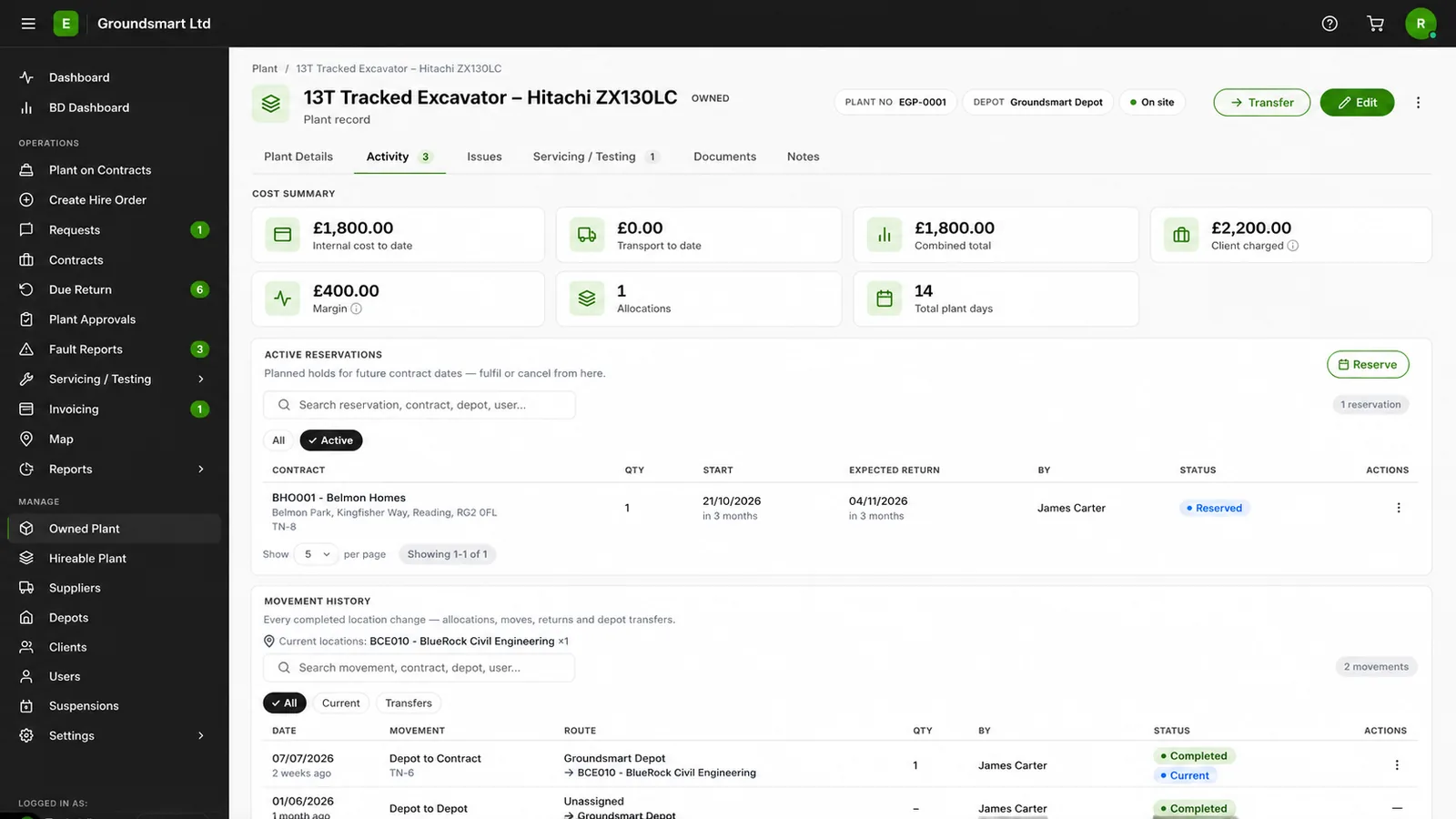
In Equipbase, every owned plant movement is a record: an allocation from a depot to a contract, a move between contracts, or a return to the yard. Moves can be requested by site teams and approved centrally, and approval re-checks date-aware availability to help prevent the same quantity being allocated twice.
Each movement carries dates, quantities, status and optional transport details. It can produce a driver delivery document, while completed allocations, transfers and returns build the asset's recorded movement history.
What you can do with owned plant transfers and movements
Depot-to-contract allocations
Put owned plant on a contract with a proper record of what went, when and for how long.
Contract-to-contract moves
Move plant directly between contracts without a fictional trip through the yard, with both contracts seeing their side of the move.
Returns to depot
Bring plant home with a record, so the yard knows what's arriving and availability updates when the return is completed.
Requests, approvals and status
Site-requested moves can wait for approval, with availability re-checked before confirmation. Requested, approved, rejected, cancelled and completed outcomes remain part of the record.
Transport and driver documents
Record driver, vehicle and transport details where needed, then generate delivery paperwork from the movement record.
Full movement history
Review an asset's recorded allocations, moves and returns, including the relevant dates, quantities and locations.
Who owned plant movement management helps
Plant managers
- Review date-aware availability before approving moves
- See each asset's recorded location and movement history
Site teams
- Request plant from other contracts or the depot
- See what's arriving and what's leaving
Operations
- One transfer process across the business
- A movement history when disputes arise
Frequently asked questions
Can site teams request transfers themselves?
Yes. Site users can request plant for their contract; the request sits as pending until it is approved or rejected. Approval re-checks availability for the requested dates before the movement is confirmed, and rejected or cancelled requests remain in the record.
Do transfers change where the asset 'lives'?
No. Each asset keeps its home depot. Transfers change where it's working, and the movement history distinguishes its home depot from its recorded current location.
What paperwork does a transfer produce?
Movements can generate a driver delivery document with the plant, the origin and destination, and transport details. See driver delivery documents.
Can a transfer be backdated if the move already happened?
Yes, movements can be recorded as of the date they actually happened, and the availability and cost calculations respect that date.
Do movements affect contract costs?
Yes. Owned plant time on a contract is calculated from completed movements and your configured internal rates. A completed contract-to-contract move ends the recorded allocation on the source contract and starts it on the destination contract from the effective movement date.